
Cha Cha Matcha

Cha Cha Matcha

Cha Cha Matcha

Mobile App Design

Mobile App Design

Mobile App Design

Two iPhones 15s displaying a Web3.0 learning app

Overview

Overview

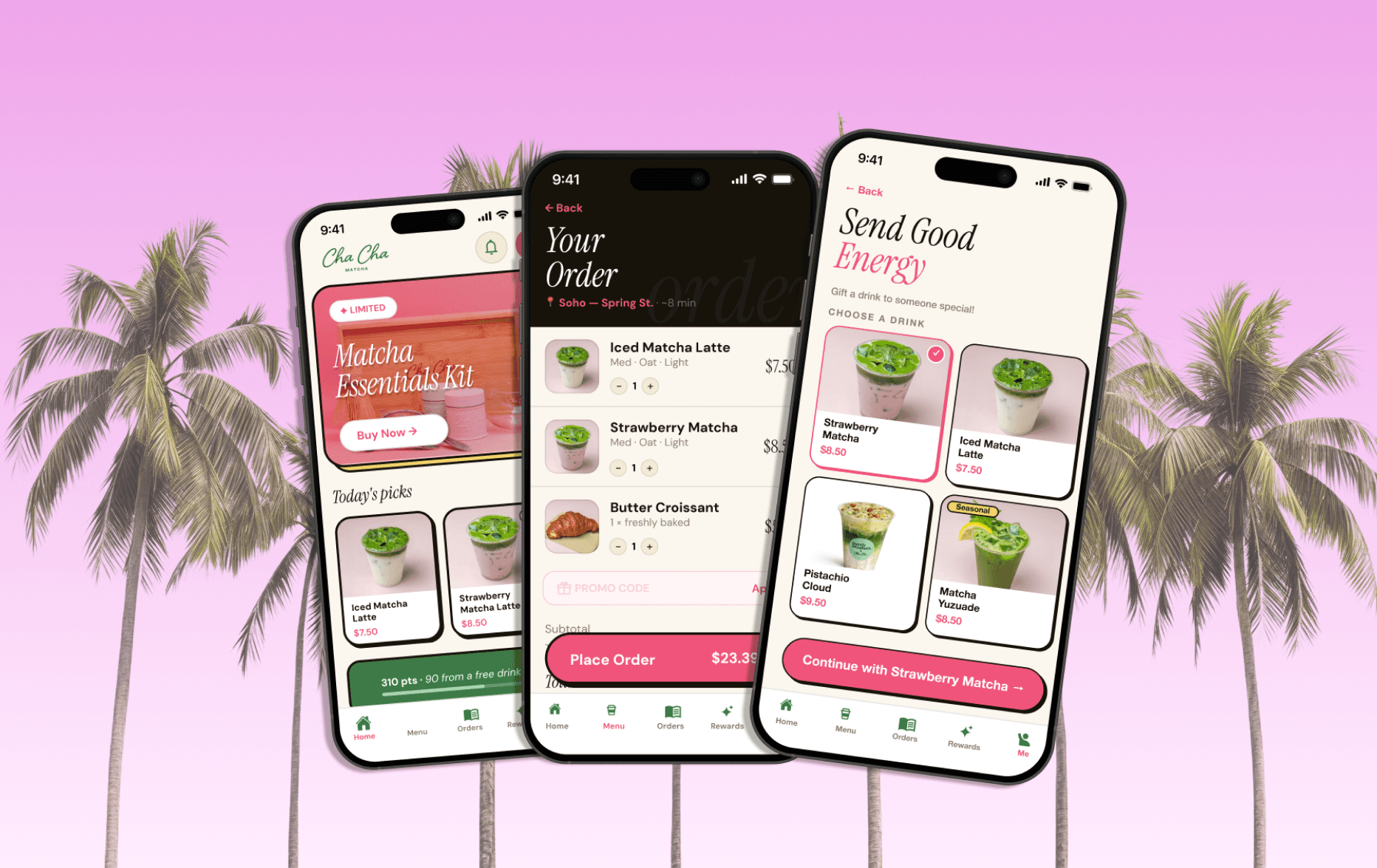
Cha Cha Matcha is one of the most recognizable café brands in New York and LA, but they have no app. Customers order through third-party platforms, there's no loyalty program, and nothing really pulling people back between visits. This project is my concept for what their app could look like. The goal was to design something that actually feels like the brand and not just a generic ordering app with their logo on it. Every screen, color, and interaction was built around the pink and green aesthetic that makes Cha Cha Matcha so recognizable on social media and in real life.

Cha Cha Matcha is one of the most recognizable café brands in New York and LA, but they have no app. Customers order through third-party platforms, there's no loyalty program, and nothing really pulling people back between visits. This project is my concept for what their app could look like. The goal was to design something that actually feels like the brand and not just a generic ordering app with their logo on it. Every screen, color, and interaction was built around the pink and green aesthetic that makes Cha Cha Matcha so recognizable on social media and in real life.

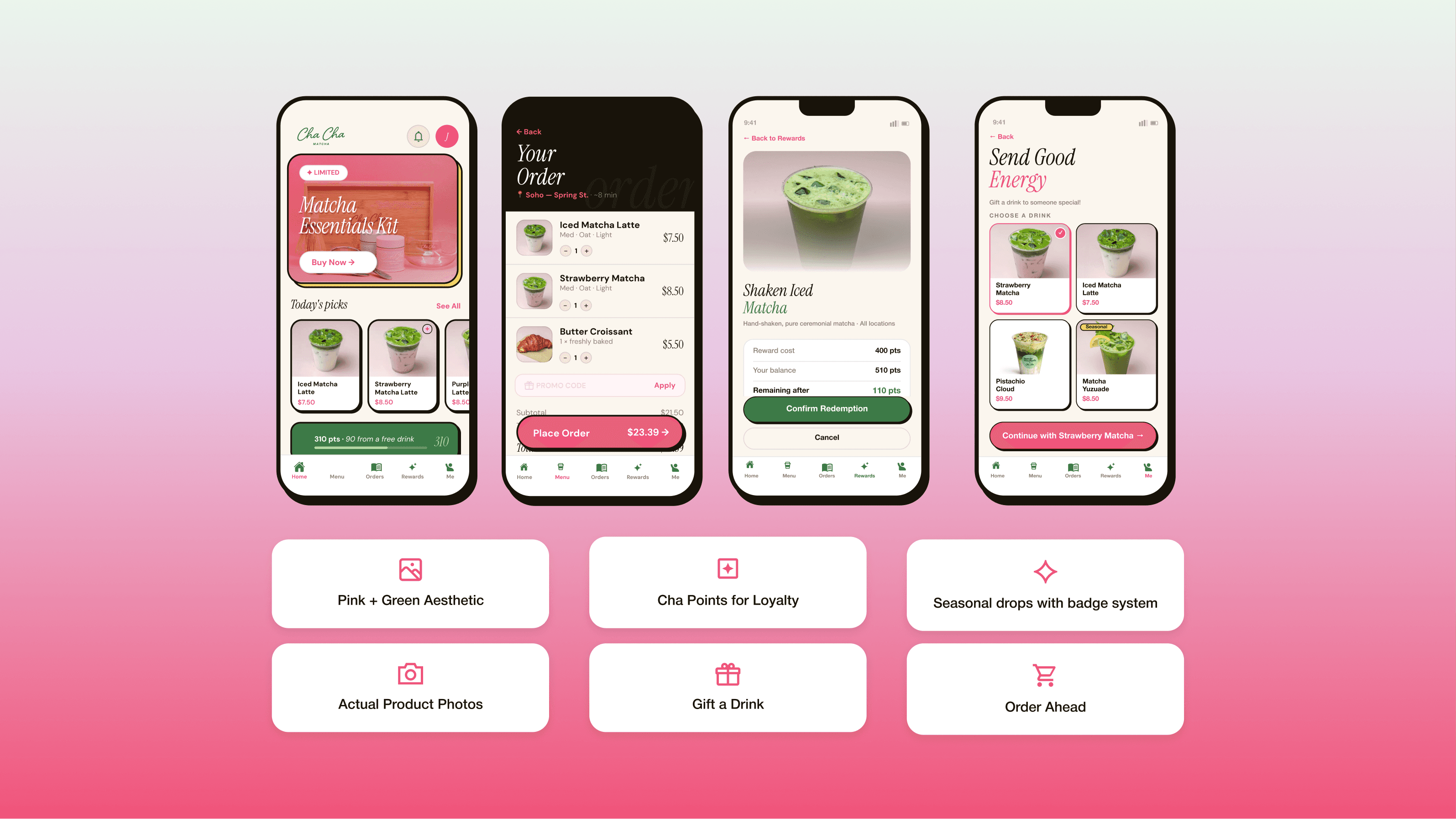
The concept covers the core ordering flow, a points-based rewards system, seasonal drop notifications, and a gifting feature. These are things their competitors either do poorly or skip entirely. It's meant to show what a realistic v1 could look like if they decided to build it. I was grateful enough to work directly with the co-founder of Cha Cha Matcha (Conrad Sandelman) on this project.

The concept covers the core ordering flow, a points-based rewards system, seasonal drop notifications, and a gifting feature. These are things their competitors either do poorly or skip entirely. It's meant to show what a realistic v1 could look like if they decided to build it. I was grateful enough to work directly with the co-founder of Cha Cha Matcha (Conrad Sandelman) on this project.

Tools Used

Figma

Design Tool

Tools Used

Figma

Design Tool

Tools Used

Figma

Design Tool

Created

Created

2026

Process

Competitive Landscape and Design Process

Before designing anything I looked at what similar apps were actually doing. La La Land Kind Café has a clean ordering flow and a loyalty system but nothing social or seasonal. Blank Street has scheduled pickups and a subscription model, but their app constantly blocks order-ahead by location and gives you zero feedback after you order. Both are fine, but neither one feels like a brand app; they just feel like utilities.

That gap is where this concept lives. Cha Cha Matcha already has the brand loyalty and the aesthetic; the app just needs to reflect that. So I designed around the things their customers actually care about, knowing when a seasonal drop is live, being able to send a drink to a friend, and not having to re-explain their order every time they show up.

The design process started with the screens people use most, home, menu, and cart, and then built outward into the features that make it different. Everything was kept simple for a v1, with gifting and seasonal drops being the two features that give people an actual reason to download it over just walking in.
Colors and fonts for a design system, made by nickelfox.com

User Flow

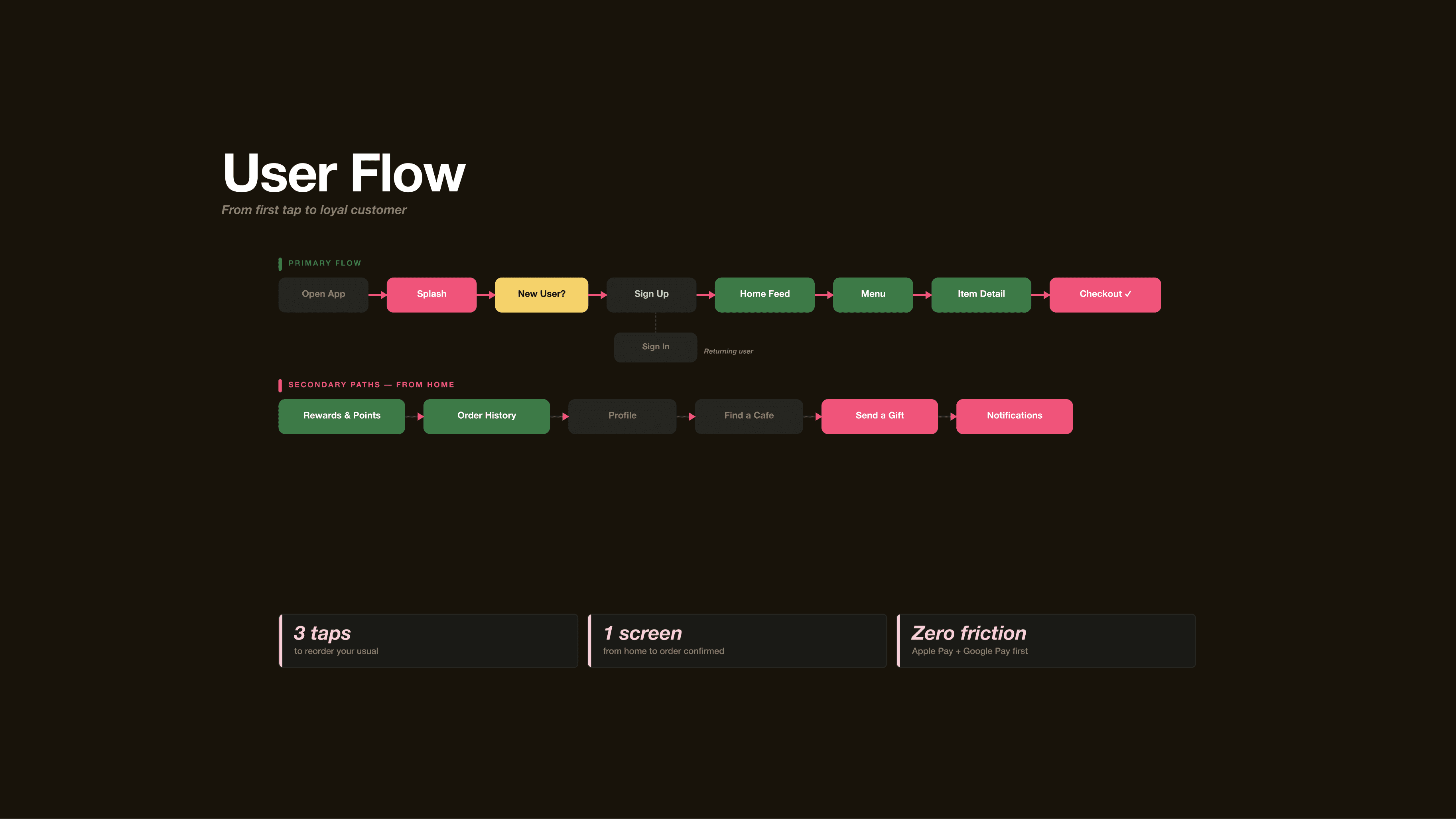
The user flow was designed to keep things as simple as possible. The primary path from opening the app to placing an order is eight steps, but for a returning user it basically collapses to three. Open the app, tap your usual, and check out. That was the thing I kept coming back to while designing, how fast can someone who already knows what they want actually get it.

The secondary paths branch from the home screen and cover everything else like rewards, order history, gifting, finding a café, and notifications. None of it is buried in settings because that's not how people actually use apps like this.

The three callouts at the bottom, 3 taps, 1 screen, and zero friction, are basically the design principles the whole flow was built around. Fast reorders, no unnecessary steps between browsing and checkout, and Apple Pay as the default so you never have to pull out your card.

User Flow

The user flow was designed to keep things as simple as possible. The primary path from opening the app to placing an order is eight steps, but for a returning user it basically collapses to three. Open the app, tap your usual, and check out. That was the thing I kept coming back to while designing, how fast can someone who already knows what they want actually get it.

The secondary paths branch from the home screen and cover everything else like rewards, order history, gifting, finding a café, and notifications. None of it is buried in settings because that's not how people actually use apps like this.

The three callouts at the bottom, 3 taps, 1 screen, and zero friction, are basically the design principles the whole flow was built around. Fast reorders, no unnecessary steps between browsing and checkout, and Apple Pay as the default so you never have to pull out your card.

User Flow

The user flow was designed to keep things as simple as possible. The primary path from opening the app to placing an order is eight steps, but for a returning user it basically collapses to three. Open the app, tap your usual, and check out. That was the thing I kept coming back to while designing, how fast can someone who already knows what they want actually get it.

The secondary paths branch from the home screen and cover everything else like rewards, order history, gifting, finding a café, and notifications. None of it is buried in settings because that's not how people actually use apps like this.

The three callouts at the bottom, 3 taps, 1 screen, and zero friction, are basically the design principles the whole flow was built around. Fast reorders, no unnecessary steps between browsing and checkout, and Apple Pay as the default so you never have to pull out your card.

Two iPhones displaying a Web3.0 learning app

Link to Full App Concept Pitch Deck

The app concept pitched to the founder is listed below:

https://drive.google.com/file/d/1XpPa3bNpgtQ79FXUxj1un6tVTvOT2TZJ/view?usp=sharing


Link to Full App Concept Pitch Deck

The app concept pitched to the founder is listed below:

https://drive.google.com/file/d/1XpPa3bNpgtQ79FXUxj1un6tVTvOT2TZJ/view?usp=sharing


Link to Full App Concept Pitch Deck

The app concept pitched to the founder is listed below:

https://drive.google.com/file/d/1XpPa3bNpgtQ79FXUxj1un6tVTvOT2TZJ/view?usp=sharing


Next Project

Next Project

Next Project

Checkout

Checkout

Checkout

->

->

Ronak Vusirikala © 2026

Ronak Vusirikala © 2026